Project Overview :
● Time As its name suggests, the Python time module enables working with time in Python. It provides features like obtaining the current date, day and time.
Requirements :
● Python
● VS code
● Library – time
Code :
import time

Time = time.ctime()
Time = Time.split(" ")
date_str = "DATE: {1}th {0} {2}".format(Time[1],Time[3],Time[5])
day_str  = "DAY: {0}".format(Time[0])
time_str = "TIME: {0}".format(Time[4])
print(date_str)
print(day_str)
print(time_str)
Code Explanation :
● The time module is part of Python's standard library. It's installed along with the rest of Python, and you don't need to install it
● import time ->import the time module
● Time = time.ctime() -> method converts a time in seconds since the epoch to a string in local time.
● Time = Time.split(" ") ->split the date, day and time
● date_str = "DATE: {1}th {0} {2}".format(Time[1],Time[3],Time[5]) ->date format
● day_str = "DAY: {0}".format(Time[0]) -> day
● time_str = "TIME: {0}".format(Time[4]) ->->time format
● print(date_str)
● print(day_str)
● print(time_str)
● Print the day, date and time.
● Run the code.
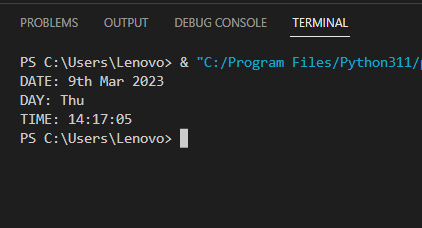
Output :
●After running the code, output of the terminal as given below,